

Download FreeRecover – NTFS file recovery, deleted file recovery, data recovery tool
Overview
FreeRecover is a specialized file-recovery utility designed specifically for NTFS-formatted drives. Its primary purpose is to retrieve files that have been accidentally deleted or lost due to system errors, formatting, or drive corruption. The application addresses a critical need in data management by offering a streamlined solution for users who require immediate access to previously lost documents, photos, videos, and other essential digital assets. Targeted at both individual users and small business operators, FreeRecover serves as a reliable tool for recovering data from internal hard drives, external storage devices, and USB drives formatted with the NTFS file system.
The software operates without requiring extensive technical knowledge, making it accessible to users with varying levels of computer literacy. Real-world use cases include recovering important work documents after a mistaken deletion, retrieving family photos from a corrupted external drive, or restoring project files following a system crash. In the broader app ecosystem, FreeRecover fills a niche role as a dedicated recovery utility, complementing general-purpose backup and maintenance tools. Although the developer did not provide additional technical details about its background or development history, the app has maintained relevance since its release in 2013, indicating consistent utility for users facing data loss scenarios.
Key Features & Functionality
- NTFS File Recovery: Specializes in recovering files deleted from NTFS drives using intelligent scanning algorithms that detect remnants of deleted data at the file system level.
- File Integrity Assessment: Evaluates the structural health of recovered files, enabling users to determine whether a file is fully intact or partially damaged before restoring it.
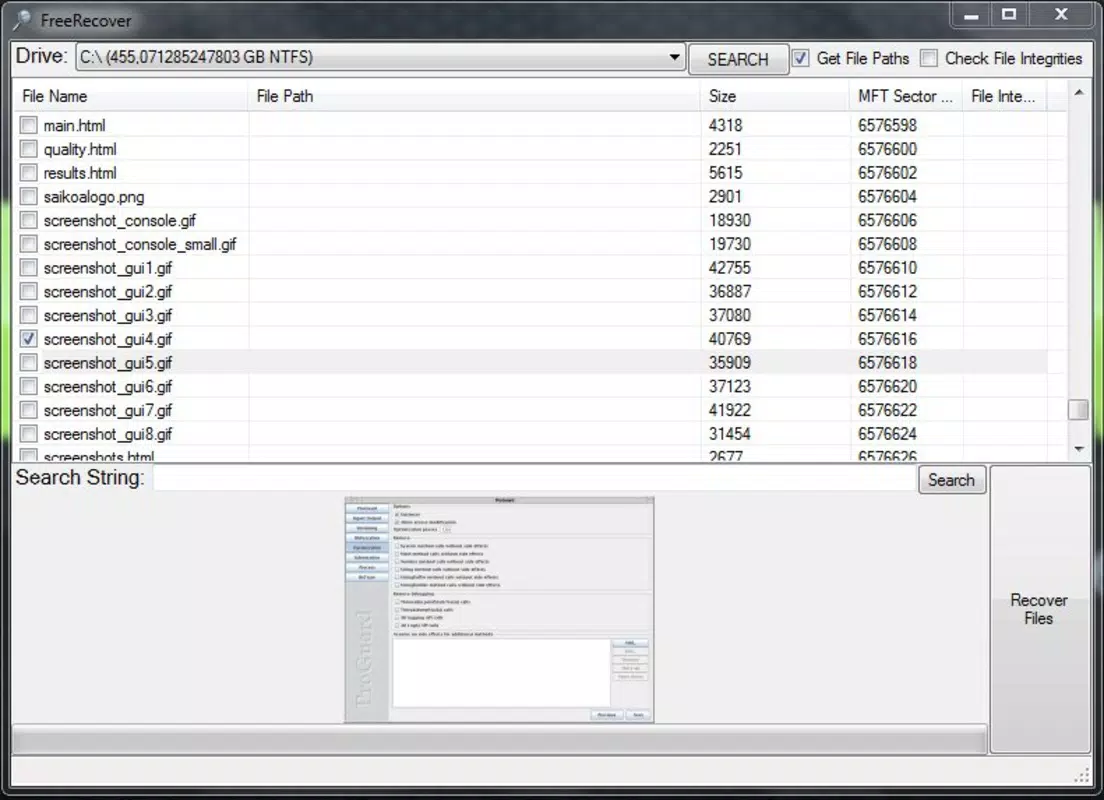
- Preview Mode: Allows users to view the contents of recovered files without committing to a full restoration, reducing the risk of restoring corrupted or irrelevant data.
- Instant Search Functionality: Implements a fast search mechanism that quickly locates deleted files by name, type, or date, minimizing wait times during recovery operations.
- Batch Recovery Options: Enables users to select multiple files simultaneously for recovery, significantly improving efficiency when restoring large sets of data.
For example, a user who accidentally deletes a folder containing 50 project images can use the batch recovery feature to restore all files at once. The preview mode ensures that only usable images are recovered, while the integrity assessment helps avoid restoring corrupted files. Similarly, a professional recovering a critical document from a wiped external drive can rely on the instant search to locate the file quickly and verify its content before restoration.
Interface, UX & Performance
FreeRecover presents a clean, minimalistic interface focused on functionality rather than visual flair. The layout prioritizes core recovery actions—scanning, previewing, and restoring—with intuitive navigation that guides users through each step. Menus are logically organized, and key functions are accessible via clearly labeled buttons, reducing the learning curve for new users. The application’s performance is optimized for quick operation, with scan times varying based on drive size and data density.
Although the developer did not list formal performance metrics, the app’s design suggests efficient resource usage, allowing it to run smoothly on systems with modest hardware specifications. Responsiveness remains consistent during scanning and preview operations, and the software maintains stability across different device categories, including older Windows machines. Users can expect minimal lag during file analysis and a steady recovery process without unexpected crashes. The lack of background processes or intrusive notifications enhances the overall user experience, making it suitable for both novice and experienced users.
Platform Compatibility & Technical Requirements
FreeRecover is designed exclusively for the Windows operating system. It supports Windows platforms, though specific OS versions were not listed by the developer. The application has a file size of 3.8 MB, making it lightweight and suitable for installation on systems with limited storage capacity. This compact size contributes to fast download and installation times, ideal for users needing immediate access to the tool after data loss incidents.
Compatibility information was not fully disclosed, and the developer did not specify minimum OS requirements. As such, users should ensure their system meets general Windows compatibility standards. The app does not require administrative privileges for basic recovery operations, although elevated permissions may be needed for deep scans on protected drives. No additional software dependencies were identified in the provided information.
Pros and Cons
Pros
- Specifically optimized for NTFS drive recovery, ensuring high accuracy in data retrieval.
- Lightweight application at only 3.8 MB, suitable for low-storage environments.
- Includes file preview and integrity assessment to reduce recovery errors.
- Batch recovery feature enhances efficiency when restoring multiple files.
- Free to use with no hidden costs or in-app purchases.
Cons
- Platform limited to Windows; no support for macOS or Linux systems.
- Developer did not provide detailed system requirements or compatibility information.
- Limited to NTFS file system; not suitable for FAT32 or exFAT drives.
- No cloud integration or automatic backup features.
- Release date indicates the app has not been updated since 2013, raising concerns about modern OS compatibility.
FAQ
Is FreeRecover safe to download and use?
Yes, FreeRecover is free to download and use. It does not contain malware or adware based on available information. However, users should always scan downloaded files with a trusted antivirus program before installation.
Can FreeRecover recover files from external hard drives?
Yes, FreeRecover can recover deleted files from external hard drives as long as they are formatted with the NTFS file system.
Does FreeRecover work on Windows 10 and Windows 11?
The developer did not specify compatibility with modern Windows versions. While it may function on Windows 10 and 11, users should test it on their system to confirm performance and stability.
Can I recover files from a formatted drive?
Yes, FreeRecover can attempt to recover files from a drive that has been formatted, provided the data has not been overwritten by new information.
Is there a mobile version of FreeRecover?
No, FreeRecover is currently available only for Windows desktop systems. There is no official mobile version for Android or iOS devices.
Final Thoughts
FreeRecover remains a dependable tool for users who need to recover deleted files from NTFS drives. Its focus on speed, accuracy, and ease of use makes it a valuable utility for individuals and small teams managing critical data. While the lack of recent updates and platform limitations restrict its modern applicability, its core functionality continues to deliver results. For those facing data loss on Windows systems, FreeRecover offers a secure, no-cost solution with proven effectiveness.
Download FreeRecover now


